November 2, 2026 · Jess Pischel
Most business owners I talk with are ready to use AI. They have heard the buzz, they have probably tried ChatGPT or Copilot, and they know their competitors are experimenting. Readiness is not what holds them back. What holds them back is not being able to picture what AI could actually do in their business, on their team's real work.
That gap is why I rebuilt our free assessment. Instead of scoring how "ready" you are, our new free AI assessment, "Where are my AI opportunities?", asks where your team loses the most time and money, then shows you the one place AI can help first.
It is ten quick questions and takes about three minutes. You tell us what costs your team the most, how often it comes up, how long it takes each time (including fixing it), how many people deal with it, and how much of it follows a pattern. A few more questions cover where the information lives today, which AI tools your team already uses, whether sensitive information is involved, and how your team feels about AI.
When you finish, you get three things:
The results are built around one simple idea: start with what costs you the most, then match that pain to what AI does best.
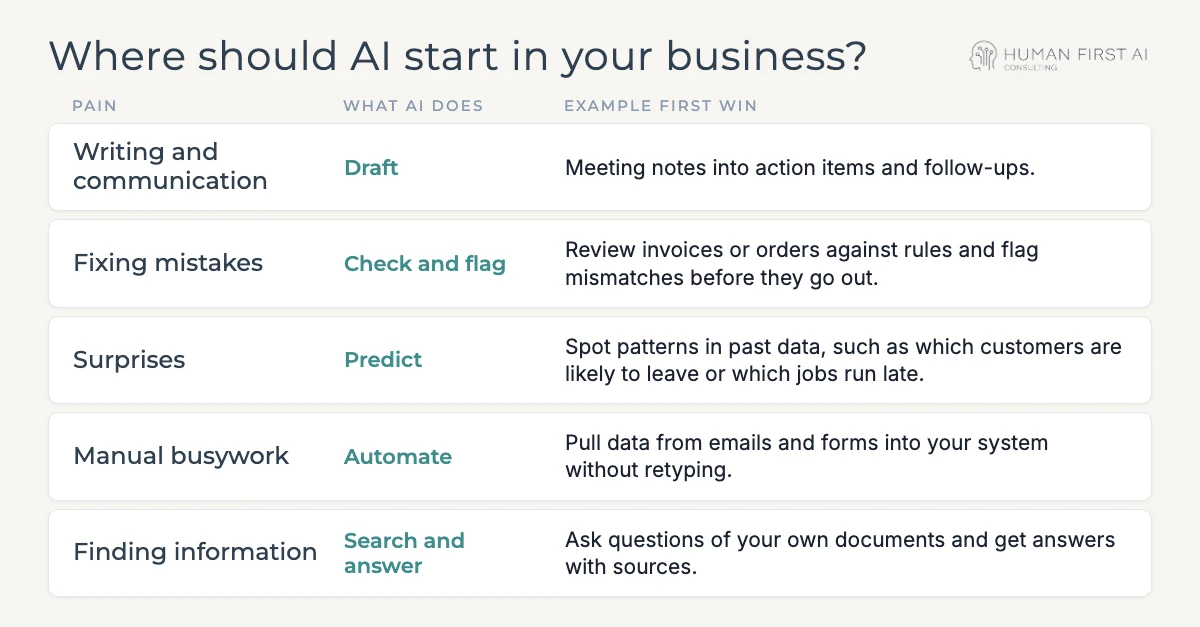
What the pain looks like: Meetings end and nobody sends the recap. Follow-up emails sit in drafts. Proposals, policies, and customer replies all start from a blank page, and the people who write them well are always the busiest.
What AI does: It produces a solid first draft in seconds, so your people spend their time editing and deciding instead of typing.
Example first win: Turn meeting notes into action items and follow-ups. Paste in your notes or a transcript, ask for a list of decisions, owners, and due dates, then ask for a short follow-up email to the attendees. A task that often slips for days gets done before the next meeting starts.
Keep it human: A person always reviews before anything is sent. AI gets the words on the page. Your team owns the message.
What the pain looks like: A wrong price on an invoice, a missing field on an order, a discount applied twice. Each one is small, but the rework, the awkward customer call, and the lost trust add up fast.
What AI does: It compares documents against the rules you give it and points out anything that does not match, so mistakes get caught before they leave the building.
Example first win: Review invoices or orders against your pricing and policy rules and flag mismatches before they go out. Write your rules down in plain language first (that step alone often fixes problems), then have AI check each batch and list what looks off.
Keep it human: AI flags, people decide. Treat every flag as a question for someone on your team to answer, not an automatic correction.
What the pain looks like: A good customer quietly stops ordering. A job runs late and nobody saw it coming. Overtime shows up after the pay period closes. By the time you notice, the cost is already locked in.
What AI does: It looks across your past data for patterns people miss and points to what is likely to happen next, so you can act early instead of reacting late.
Example first win: Spot patterns in past data, such as which customers are likely to leave or which jobs tend to run late. Start with an export you already have, like a year of orders or job records, and ask what the late jobs or lost customers had in common.
Keep it human: Predictions are only as good as the data behind them. Use them as early warnings that prompt a conversation, and check them against what your team knows from the field.
What the pain looks like: Someone on your team copies details from emails, web forms, or PDFs into your CRM, spreadsheet, or scheduling system. Every day. It is slow, it is boring, and retyping is exactly where errors creep in.
What AI does: It reads incoming information, pulls out the fields you need, and moves them where they belong, on a schedule or every time something new arrives.
Example first win: Pull data from emails and forms into your system without retyping. Pick one high-volume form or inbox, list the fields you copy today, and automate just that one flow before adding more.
Keep it human: Fix the process before you automate it. Automating a messy process just makes the mess faster. Spot-check the results for the first few weeks.
What the pain looks like: The answer is in a policy manual, a contract, an old proposal, or someone's inbox, but finding it takes twenty minutes or a tap on the shoulder of the one person who knows. New hires feel this the most.
What AI does: It searches your own documents and answers questions in plain language, with links back to the source so anyone can check the answer.
Example first win: Ask questions of your own documents and get answers with sources. Gather the handful of documents people ask about most, such as your handbook, procedures, or product specs, and set up an assistant that can only answer from those files.
Keep it human: Always ask for the source and click it. And be careful with sensitive information: client records, financials, and HR files belong in a secure, business-grade tool, not a free public one.
That is common. Many businesses feel a little of all five, and the biggest cost does not always fit neatly in one box. That is exactly what the assessment is for. It helps you name the one problem worth solving first, and gives you a realistic sense of the time it could free up.
Your next step: Take the free three-minute assessment. If you would rather talk it through, book a free, no-pressure discovery call and we will pick your first AI win together.